Draw
Routines for drawing sprites and primitives to the screen.
Header: #include <asw/modules/draw.h>
Namespace: asw::draw
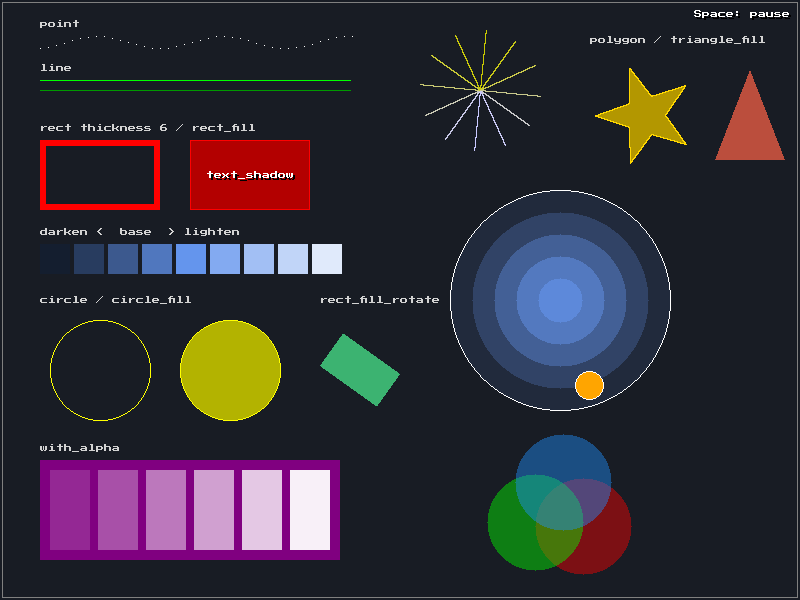
From the primitives example.
Sprite Drawing
sprite
void sprite(const asw::Texture& tex, const asw::Vec2<float>& position);Draw a texture at the given position.
sprite_flip
void sprite_flip(const asw::Texture& tex,
                 const asw::Vec2<float>& position,
                 bool flip_x,
                 bool flip_y);
Draw a sprite with optional horizontal and/or vertical flipping.
stretch_sprite
void stretch_sprite(const asw::Texture& tex, const asw::Quad<float>& position);Draw a sprite stretched to fit the given quad (position + size).
rotate_sprite
void rotate_sprite(const asw::Texture& tex,
                   const asw::Vec2<float>& position,
                   float angle);
Draw a sprite rotated by the given angle (in radians).
stretch_sprite_blit
void stretch_sprite_blit(const asw::Texture& tex,
                         const asw::Quad<float>& source,
                         const asw::Quad<float>& dest);
Draw a portion of a texture (defined by source) stretched to the dest quad.
stretch_sprite_rotate
void stretch_sprite_rotate(const asw::Texture& tex,
                           const asw::Quad<float>& dest,
                           float angle,
                           bool flip_x = false,
                           bool flip_y = false);
Draw a sprite stretched to the dest quad, rotated around its center (angle in radians), and optionally flipped.
stretch_sprite_rotate_blit
void stretch_sprite_rotate_blit(const asw::Texture& tex,
                                const asw::Quad<float>& source,
                                const asw::Quad<float>& dest,
                                float angle,
                                bool flip_x = false,
                                bool flip_y = false);
Draw a portion of a texture stretched to the dest quad, rotated (angle in radians), and optionally flipped.
Text Drawing
text
void text(const asw::Font& font,
          const std::string& text,
          const asw::Vec2<float>& position,
          asw::Color color,
          asw::TextJustify justify = asw::TextJustify::Left);
Draw text with the specified justification. The position is rounded to whole pixels after justification, so glyphs stay sharp. Smooth fonts are rendered at the output resolution, so text stays sharp when the window is scaled up or on high density displays. Rendered text is cached. The alpha of color is applied when the text is drawn, so you can fade text without making a new cached texture for each alpha value.
| Parameter | Type | Default | Description |
|---|---|---|---|
font | const asw::Font& | The font to use | |
text | const std::string& | The text to draw | |
position | const asw::Vec2<float>& | The position to draw at | |
color | asw::Color | The text color | |
justify | asw::TextJustify | Left | Text alignment (Left, Center, Right) |
text_shadow
void text_shadow(const asw::Font& font,
                 const std::string& text,
                 const asw::Vec2<float>& position,
                 asw::Color color,
                 asw::Color shadow = asw::Color(0, 0, 0),
                 const asw::Vec2<float>& offset = asw::Vec2<float>(2.0F, 2.0F),
                 asw::TextJustify justify = asw::TextJustify::Left);
Draw text with a drop shadow behind it, so the text is easy to read on any background. The alpha of the shadow is multiplied by the alpha of color, so the shadow fades with the text.
| Parameter | Type | Default | Description |
|---|---|---|---|
font | const asw::Font& | The font to use | |
text | const std::string& | The text to draw | |
position | const asw::Vec2<float>& | The position to draw at | |
color | asw::Color | The text color | |
shadow | asw::Color | black | The shadow color |
offset | const asw::Vec2<float>& | {2, 2} | The distance from the text to the shadow |
justify | asw::TextJustify | Left | Text alignment (Left, Center, Right) |
clear_text_cache
void clear_text_cache();Clear the cache of rendered text textures. The cache depends on the active renderer and fonts. asw::core::shutdown() clears it before SDL teardown.
Primitive Drawing
clear_color
void clear_color(asw::Color color);Clear the screen to a color.
point
void point(const asw::Vec2<float>& position, asw::Color color);Draw a single point.
line
void line(const asw::Vec2<float>& position1,
          const asw::Vec2<float>& position2,
          asw::Color color);
Draw a line between two points.
rect
void rect(const asw::Quad<float>& position, asw::Color color, float thickness = 1.0F);Draw an outlined rectangle. thickness is the width of the outline in pixels. The outline is drawn inside the quad.
rect_fill
void rect_fill(const asw::Quad<float>& position, asw::Color color);Draw a filled rectangle.
rect_fill_rotate
void rect_fill_rotate(const asw::Quad<float>& position, float angle, asw::Color color);Draw a filled rectangle rotated around its center. position is the rectangle before rotation. angle is in radians, clockwise, the same as the sprite rotation functions.
circle
void circle(const asw::Vec2<float>& position, float radius, asw::Color color);Draw an outlined circle.
circle_fill
void circle_fill(const asw::Vec2<float>& position, float radius, asw::Color color);Draw a filled circle.
triangle_fill
void triangle_fill(const asw::Vec2<float>& a, const asw::Vec2<float>& b,
                   const asw::Vec2<float>& c, asw::Color color);
Draw a filled triangle.
polygon
void polygon(const asw::Polygonf& points, asw::Color color);Draw the outline of a polygon. The last point joins the first. See Polygon.
polygon_fill
void polygon_fill(const asw::Polygonf& points, asw::Color color);Draw a filled polygon. The corners can go either way round. The polygon can be concave, but its edges must not cross.
asw::Polygonf arrow = {{0, 10}, {20, 10}, {20, 0}, {35, 15}, {20, 30}, {20, 20}, {0, 20}};
asw::draw::polygon_fill(arrow, asw::color::orange);
asw::draw::polygon(arrow, asw::color::white);
Texture Utilities
set_blend_mode
void set_blend_mode(const asw::Texture& texture, asw::BlendMode mode);Set the blend mode of a texture. To set the blend mode for primitives, use asw::display::set_blend_mode.
set_alpha
void set_alpha(const asw::Texture& texture, float alpha);Set the alpha (opacity) of a texture.
set_tint
void set_tint(const asw::Texture& texture, asw::Color tint);Set the tint of a texture. Each color channel is multiplied by the tint when drawn. White draws the texture unchanged. The alpha of tint is ignored; use set_alpha for transparency.
set_scale_mode
void set_scale_mode(const asw::Texture& texture, asw::ScaleMode mode);Set the scale mode of a texture. ScaleMode::Nearest keeps hard pixel edges. ScaleMode::Linear makes the texture smooth when it is scaled. See ScaleMode.
Example
auto tex = asw::assets::load_texture("player.png");
auto font = asw::assets::load_font("font.ttf", 16);

// Draw sprite
asw::draw::sprite(tex, {100.0f, 200.0f});

// Draw rotated sprite (radians)
asw::draw::rotate_sprite(tex, {100.0f, 200.0f}, 0.785f);

// Tint a sprite red
asw::draw::set_tint(tex, asw::color::red);

// Draw primitives
asw::draw::rect_fill({10, 10, 100, 50}, asw::color::red);
asw::draw::rect({10, 70, 100, 50}, asw::color::white, 3.0f);
asw::draw::rect_fill_rotate({150, 10, 40, 40}, 0.785f, asw::color::yellow);
asw::draw::circle_fill({200.0f, 200.0f}, 30.0f, asw::color::lime);

// Draw text with justification
asw::draw::text(font, "Hello ASW!", {10.0f, 10.0f}, asw::color::white);
asw::draw::text(font, "Centered", {320.0f, 10.0f}, asw::color::white, asw::TextJustify::Center);

// Draw text with a drop shadow
asw::draw::text_shadow(font, "Score: 100", {10.0f, 40.0f}, asw::color::white);

// Keep hard pixel edges when scaled
asw::draw::set_scale_mode(tex, asw::ScaleMode::Nearest);