UI
Retained-mode UI widget system with theming, layouts, focus navigation, and input handling.
Header: #include <asw/modules/ui/ui.h>
Namespace: asw::ui
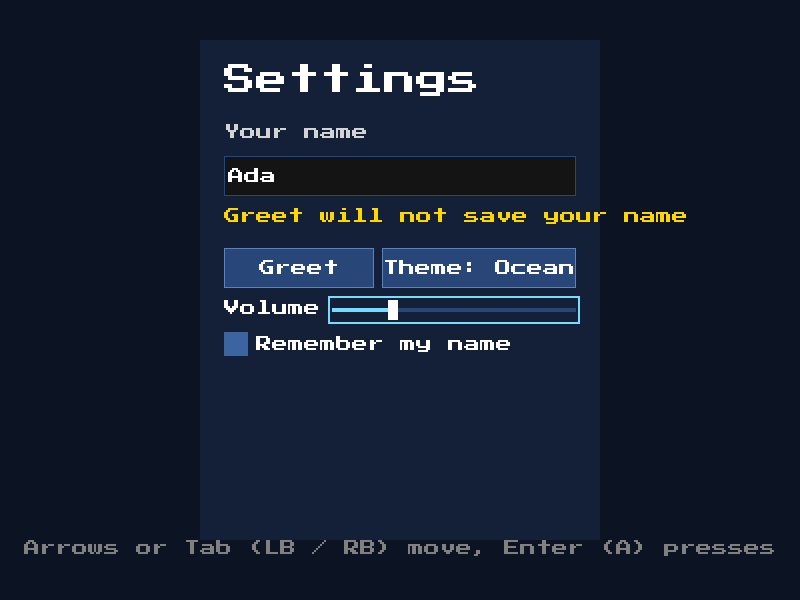
From the ui example.
Widget
Base class for all UI widgets. Provides identity, visibility, focus, parent/child tree management, and virtual methods for layout, event handling, activation, and drawing.
class Widget;Fields
| Field | Type | Default | Description |
|---|---|---|---|
visible | bool | true | Whether the widget is visible |
enabled | bool | true | Whether the widget is enabled |
focusable | bool | false | Whether the widget can receive focus. Only focusable widgets can be pressed with the pointer |
nav_up / nav_down / nav_left / nav_right | Widget* | nullptr | Widget to focus in that direction, instead of the nearest one |
focus_ring | bool | true | Draw the theme focus ring while the widget has visible focus. Turn off for widgets that show focus themselves |
parent | Widget* | nullptr | Pointer to the parent widget |
transform | asw::Quad<float> | Position and size | |
anchor | Anchor | None | Pin the widget to a point of its parent, e.g. BottomRight for a corner button. The parent places it at each layout, so it stays in place when the screen or its own size changes. Stack and Grid place their children themselves, and ignore it |
anchor_margin | asw::Vec2<float> | {0, 0} | Space between an anchored widget and the edges of its parent |
Anchor Enum
enum class Anchor {
  None,
  TopLeft, Top, TopRight,
  Left, Center, Right,
  BottomLeft, Bottom, BottomRight,
};auto& settings = ui.root.add_child<asw::ui::Button>();
settings.set_text("Settings", true);
settings.anchor = asw::ui::Anchor::BottomRight;
settings.anchor_margin = {20.0f, 20.0f};Methods
is_hovered / is_pressed / is_focused / is_captured
bool is_hovered() const;
bool is_pressed() const;
bool is_focused() const;
bool is_captured() const;
Get the interaction state of the widget: the pointer is over it, it is being pressed, it holds focus, or it was pressed and the pointer is still held (even off the widget). Root and FocusManager set these states.
is_highlighted
bool is_highlighted(const Context& ctx) const;Returns true if the widget should draw its hover look: it is hovered, pressed, or focused while focus is shown.
id
WidgetId id() const;Get the unique identifier for this widget (WidgetId is uint32_t).
children
const std::vector<std::unique_ptr<Widget>>& children() const;Get the child widgets. Change them with add_child, remove_child and clear_children.
Changed in v0.12.2
children was a public field. It is now private. Read it with children().
measure
virtual void measure(Context& ctx);Set this widget's own size, before its parent places it. Does nothing by default. Override it for a widget whose size depends on the context, e.g. on the theme font. Button uses it to fit its text.
layout
virtual void layout(Context& ctx);Lay out this widget and its children.
on_event
virtual bool on_event(Context& ctx, const UIEvent& e);Handle a UI event. Returns true if the event was consumed.
on_focus_changed
virtual void on_focus_changed(Context& ctx, bool focused);Called when focus state changes.
activate
virtual void activate(Context& ctx);Called when the widget is clicked, or activated with the keyboard or a controller while focused. Does nothing by default. Override this for custom widgets, instead of handling clicks in on_event.
draw
virtual void draw(Context& ctx);Draw this widget and its children.
add_child
template <class T, class... Args>
T& add_child(Args&&... args);
Add a child widget of type T (must derive from Widget). Returns a reference to the new child.
remove_child / clear_children
bool remove_child(const Widget& child);
void clear_children();
Remove one child, or all children. remove_child returns false if the widget is not a child of this widget. A removed widget leaves the tree at once, and is destroyed at the next Root::update(). Thus a callback can remove any widget, even the widget that it runs in.
Moving a widget
A moved widget takes the children with it, and they point to it as their parent. A move-constructed widget gets a new id and no parent. A move-assigned widget keeps its place in the tree: its parent, id and state. Its old children are removed as with clear_children.
UIEvent
Event structure for UI interactions.
struct UIEvent;Event Types
enum class Type {
  KeyDown, KeyUp, TextInput,
  PointerDown, PointerUp, PointerMove,
  PointerEnter, PointerLeave,
  Back
};
There is no Activate event. Root calls Widget::activate() instead.
Fields
| Field | Type | Description |
|---|---|---|
type | Type | The event type |
key | asw::input::Key | Key associated with keyboard events |
pointer_id | int | Pointer identifier |
pointer_pos | asw::Vec2<float> | Pointer position |
mouse_button | asw::input::MouseButton | Mouse button for pointer events |
text | std::string | Text for TextInput events |
Theme
Visual style for all UI elements. Each widget type has a style struct. Set the struct on the theme to change every widget of that type, or set the widget's own style to change one widget.
struct Theme;| Field | Type | Default | Description |
|---|---|---|---|
text | asw::Color | white | Default text color |
text_dim | asw::Color | light gray | Dimmed text color |
panel_bg | asw::Color | dark gray | Panel background |
font | asw::Font | nullptr | Font for widgets that do not set their own |
button | ButtonStyle | Default button style | |
checkbox | CheckboxStyle | Default checkbox style | |
input | InputStyle | Default input box style | |
slider | SliderStyle | Default slider style | |
focus_ring | FocusRingStyle | Focus ring style | |
toast | ToastStyle | Style of messages from Root::toast | |
modal | ModalStyle | Style of modals from Root::open_modal | |
padding | float | 10.0 | Default padding |
gap | float | 8.0 | Default gap between elements |
sound_move | asw::Sample | nullptr | Played on the Ui sound bus when navigation moves focus |
sound_activate | asw::Sample | nullptr | Played on the Ui sound bus when a widget is clicked or activated |
ButtonStyle
Used by Button and Choice.
| Field | Type | Default | Description |
|---|---|---|---|
bg | asw::Color | {55, 55, 55} | Background color |
bg_hover | asw::Color | {75, 75, 75} | Background while hovered, or focused with focus shown |
bg_pressed | asw::Color | {95, 95, 95} | Background while pressed |
bg_disabled | asw::Color | {30, 30, 30} | Background while disabled |
text | asw::Color | white | Text color |
text_hover | asw::Color | white | Text color while hovered, or focused with focus shown |
text_disabled | asw::Color | {200, 200, 200} | Text color while disabled |
border | asw::Color | transparent | Border color |
border_width | float | 0 | Border width in pixels, drawn inside the button. 0 draws no border |
text_align | asw::TextJustify | Center | Where the text sits. Left and right are inset by the button padding |
CheckboxStyle
| Field | Type | Default | Description |
|---|---|---|---|
bg / bg_hover | asw::Color | transparent | Background of the whole row, normal and highlighted |
border | asw::Color | transparent | Row border color |
border_width | float | 0 | Row border width. 0 draws no border |
box | asw::Color | {55, 55, 55} | Box color |
box_hover | asw::Color | {75, 75, 75} | Box color while highlighted |
box_pressed | asw::Color | {95, 95, 95} | Box color while pressed |
box_disabled | asw::Color | {30, 30, 30} | Box color while disabled |
box_border | asw::Color | transparent | Box border color |
box_border_width | float | 0 | Box border width. 0 draws no border |
mark / mark_disabled | asw::Color | white / {200, 200, 200} | Check mark color, normal and disabled |
text / text_disabled | asw::Color | white / {200, 200, 200} | Text color, normal and disabled |
box_side | BoxSide | Left | Side of the box (BoxSide::Left or BoxSide::Right). The text is on the other side |
InputStyle
| Field | Type | Default | Description |
|---|---|---|---|
bg | asw::Color | {20, 20, 20} | Background color |
bg_disabled | asw::Color | {30, 30, 30} | Background while disabled |
border | asw::Color | {55, 55, 55} | Border color |
border_hover | asw::Color | {75, 75, 75} | Border color while hovered |
border_width | float | 1 | Border width. 0 draws no border |
text | asw::Color | white | Text color |
placeholder | asw::Color | {200, 200, 200} | Placeholder text color |
caret | asw::Color | white | Text cursor color |
SliderStyle
| Field | Type | Default | Description |
|---|---|---|---|
track | asw::Color | {55, 55, 55} | Track color |
fill | asw::Color | {255, 200, 80} | Track color up to the value |
knob | asw::Color | {200, 200, 200} | Knob color |
knob_hover | asw::Color | white | Knob color while hovered, pressed, or focused with focus shown |
knob_editing | asw::Color | {255, 200, 80} | Knob color while in edit mode |
disabled | asw::Color | {90, 90, 90} | Knob and fill color while disabled |
track_height | float | 4 | Track height in pixels, centred in the widget |
knob_width | float | 10 | Knob width in pixels. The knob is as tall as the widget |
FocusRingStyle
The ring drawn around the focused widget during keyboard or controller navigation.
| Field | Type | Default | Description |
|---|---|---|---|
color | asw::Color | {255, 200, 80} | Ring color |
width | float | 1 | Ring width in pixels. 0 draws no ring |
offset | float | 2 | Gap between the widget and the ring, in pixels |
ToastStyle
| Field | Type | Default | Description |
|---|---|---|---|
bg | asw::Color | {20, 20, 20, 230} | Fill behind each message |
text | asw::Color | white | Message text color |
border / border_width | asw::Color / float | none / 0 | Outline. No outline when the width is 0 |
padding | float | 12 | Space around the text in each message |
margin | float | 16 | Space from the edge of the screen to the first message |
gap | float | 8 | Space between messages |
seconds | float | 3 | How long a message stays, from when it shows |
fade_seconds | float | 0.25 | How long a message takes to fade out at the end |
max_visible | std::size_t | 3 | Messages on screen at the same time. The others wait |
anchor | Anchor | Top | Where messages show. Top, TopLeft and TopRight stack down from the top. Bottom, BottomLeft and BottomRight stack up from the bottom |
ModalStyle
| Field | Type | Default | Description |
|---|---|---|---|
dim | asw::Color | {0, 0, 0, 160} | Color over the screen behind the modal |
bg | asw::Color | {30, 30, 30} | Fill of the modal |
border / border_width | asw::Color / float | none / 0 | Outline. No outline when the width is 0 |
padding | float | 20 | Space between the edge of the modal and its content |
gap | float | 12 | Space between its widgets |
min_width | float | 320 | Smallest width of the modal |
Helpers
const asw::Font& pick_font(const asw::Font& own, const Theme& theme);
void draw_focus_ring(const FocusRingStyle& style, const asw::Quad<float>& bounds);
pick_font returns the widget's own font, or the theme font if the widget has none. draw_focus_ring draws a focus ring around bounds. Use them in custom widgets.
Navigation
Action names the UI reads for focus navigation. See Action.
struct Navigation;| Field | Description |
|---|---|
up / down / left / right | Move focus in a direction |
next | Move focus to the next widget. Hold Shift to go back, so Shift+Tab works when Tab is bound here |
prev | Move focus to the previous widget |
activate | Press the focused widget |
back | Go back. Sent to the focused widget, then to Root::on_back |
A key that types text into an InputBox does not also navigate, activate or go back.
An empty name uses the built-in keys for that step: arrows, Tab and Shift+Tab, Enter or Space, and Escape. Set a name to read that action instead, so the UI follows the game's own bindings, controllers included.
bind_default_navigation
Navigation bind_default_navigation(std::string_view prefix = "ui_");Bind keyboard and controller actions for UI navigation and return their names. Set the result on Context::navigation. If you call it again, it replaces the bindings. For any controller, it binds:
| Action | Bindings |
|---|---|
| up, down, left, right | Arrow keys, D-pad, and left stick |
| next | Tab and right shoulder |
| prev | Left shoulder |
| activate | Enter, Space, and A |
| back | Escape and B |
// Default keyboard and controller bindings
ui.ctx.navigation = asw::ui::bind_default_navigation();

// Or the game's own actions
ui.ctx.navigation.up = "move_up";
ui.ctx.navigation.activate = "jump";
Context
Shared state for the UI system.
class Context;| Field | Type | Description |
|---|---|---|
theme | Theme | The current UI theme |
focus | FocusManager | Focus navigation manager |
navigation | Navigation | Actions to read for focus navigation |
show_focus | bool | Whether focus is shown. Root turns it on for keyboard and controller navigation and off when the mouse is used |
FocusManager
Manages keyboard and directional focus navigation.
class FocusManager;| Member | Description |
|---|---|
default_focus | Widget* focused by the first navigation press when nothing has focus. If nullptr, the first focusable widget is used |
focused() | Get the currently focused widget (or nullptr) |
set_focus(Context& ctx, Widget* w) | Set focus to a specific widget |
focus_next(Context& ctx) | Move focus to the next widget |
focus_prev(Context& ctx) | Move focus to the previous widget |
focus_start(Context& ctx) | Focus default_focus, or the first focusable widget, when nothing has focus. Returns true if focus was set |
focus_dir(Context& ctx, int dx, int dy) | Move focus in a 2D direction |
A hidden or disabled widget cannot take focus, and neither can its children.
focus_dir picks the target in this order:
- The widget's
nav_up,nav_down,nav_leftornav_right, if set. - Widgets in the same lane (they overlap across the direction of the move) before other widgets.
- The nearest widget, edge to edge.
- The widget closest to the lane where repeated moves in the same direction started.
Root
Top-level manager that owns the UI tree, reads input, and draws. Call update() once per frame after asw::core::update(), then draw(). Root tracks hover, press, focus and the focus ring for every widget.
class Root;Fields
| Field | Type | Default | Description |
|---|---|---|---|
ctx | Context | The UI context | |
root | Panel | The root panel widget. It is transparent. Set root.bg for a background | |
on_back | std::function<void()> | Called when back is pressed and the focused widget does not use it, e.g. to leave a menu | |
auto_size | bool | true | Keep the root panel the size of the logical screen. set_size turns it off |
Methods
| Method | Description |
|---|---|
set_size(float w, float h) | Set a fixed size for the root panel |
update() | Process input for this frame. Returns true if the UI used input: the pointer is over or pressing a widget, or a navigation, activate, back or text key went to the UI. Skip your game's own input for that frame when it returns true |
draw() | Draw the UI tree, then the focus ring |
focus(Widget& w, bool show = false) | Focus a widget. It must be focusable and in this tree. If show is true, the focus ring is shown, as with keyboard navigation |
clear_focus() | Remove focus from every widget |
toast(const std::string& text) | Show a message for a few seconds, e.g. "Achievement unlocked". Messages wait in a queue when many arrive together |
toast(Toast message) | Show a message with its own icon, color or time |
clear_toasts() | Remove every message, shown or waiting |
toast_count() | Get the number of messages, shown or waiting |
open_modal<T = Modal>(args...) | Open a modal over the rest of the UI, and return it |
has_modal() | Returns true while a modal is open |
close_modals() | Close every open modal, top first |
if (!ui.update()) {
  // The UI did not use input this frame
  player.update();
}
Toast
struct Toast;| Field | Type | Default | Description |
|---|---|---|---|
text | std::string | The message | |
icon | asw::Texture | nullptr | Image before the text, e.g. an achievement icon |
seconds | float | 0 | How long the message stays. 0 uses the theme toast.seconds |
color | std::optional<asw::Color> | Text color. Uses the theme toast.text when empty |
Toasts use real time, so they fade out at the same speed when the game is paused.
ui.toast("Saved");
ui.toast({.text = "Achievement unlocked", .icon = trophy, .seconds = 5.0f});
Layouts
Stack
Places children one after another, top to bottom or left to right. Children keep their own size along the stack, for example the height of each row in a vertical stack. Across the stack, they follow align. Hidden children take no space. Put stacks in stacks to make rows inside columns. When Stretch stops forcing a size on a child, e.g. after align changes, the child gets its own size back.
class Stack : public Widget;| Field | Type | Default | Description |
|---|---|---|---|
direction | Direction | Vertical | Direction::Vertical or Direction::Horizontal |
align | Align | Stretch | Where children sit across the stack: Start, Center, End, or Stretch to fill |
gap | float | 8.0 | Space between children |
padding | float | 0.0 | Space inside the stack on every side |
VBox
A vertical Stack with padding set to 10.0. It is now in layout.h. The old vbox.h header still works.
class VBox : public Stack;Grid
Places children in a grid and fills each row left to right, e.g. a level select or a 2 by 2 menu. All cells have the same width, set by columns. Children fill their cell. Hidden children take no cell.
class Grid : public Widget;| Field | Type | Default | Description |
|---|---|---|---|
columns | std::size_t | 2 | Number of columns |
gap | float | 8.0 | Space between cells, both ways |
padding | float | 0.0 | Space inside the grid on every side |
row_height | float | 0.0 | Height of every row. 0 makes each row as tall as its tallest child |
A child that the row made taller gets its own height back when the row stops forcing it, e.g. after the tallest child in the row is hidden.
in_row_with_focusables
bool in_row_with_focusables(const Widget& w);Returns true if the widget's parent is a horizontal Stack, or a Grid with more than one column, that holds another visible, enabled, focusable child. Choice and Slider use this to keep left and right for moving focus in the row.
Widgets
Panel
A container widget with an optional background color or image.
class Panel : public Widget;| Field | Type | Default | Description |
|---|---|---|---|
bg | asw::Color | transparent | Background color. A fully transparent bg is not drawn |
bg_image | asw::Texture | nullptr | Background image texture |
Label
A non-focusable text display widget.
class Label : public Widget;| Field | Type | Default | Description |
|---|---|---|---|
font | asw::Font | Font. Uses the theme font when empty | |
text | std::string | Text to display | |
justify | asw::TextJustify | Left | Text justification |
color | std::optional<asw::Color> | Text color. Uses the theme text color when empty |
| Method | Description |
|---|---|
set_text(const std::string& t, bool auto_size = false) | Set the text. If auto_size is true, the label is sized to its text when it is measured, so layouts such as VBox and Modal give it room |
Image
A texture stretched over the widget, e.g. a logo or icon in a layout.
class Image : public Widget;| Member | Description |
|---|---|
texture | The asw::Texture to draw |
set_texture(const asw::Texture& tex, bool auto_size = true) | Set the texture. If auto_size is true, resize the widget to the texture size |
Button
An interactive button widget (focusable).
class Button : public Widget;| Field | Type | Description |
|---|---|---|
on_click | std::function<void()> | Callback invoked on a left click, or when the button is activated with the keyboard or a controller |
padding | float | Padding inside the button on all sides (default: 0) |
font | asw::Font | Font for the button text. Uses the theme font when empty |
text | std::string | Button label text |
texture | asw::Texture | Texture to display on the button |
texture_hover | asw::Texture | Texture while hovered, or focused with focus shown. Falls back to texture |
texture_pressed | asw::Texture | Texture while pressed. Falls back to texture_hover, then texture |
texture_disabled | asw::Texture | Texture while disabled. Falls back to texture |
draw_background | bool | Fill the button with the style background (default: true). Turn off for image-only buttons |
style | std::optional<ButtonStyle> | Style for this button only. Uses the theme button style when empty |
| Method | Description |
|---|---|
set_text(const std::string& t, bool auto_size = false) | Set the text. If auto_size is true, resize the button to fit the text. A button without its own font is sized with the theme font when it is next measured, before its parent places it |
set_texture(const asw::Texture& tex, bool auto_size = false) | Set the texture. If auto_size is true, resize the button to the texture size |
set_images(normal, hover = nullptr, pressed = nullptr, disabled = nullptr, bool auto_size = true) | Make an image button: set the state textures, turn off the background, and optionally resize the button to the normal texture |
get_style(const Context& ctx) | Get the style the button draws with: its own style, or the theme button style |
An image button that swaps to a second image on hover:
auto& play = root.add_child<asw::ui::Button>();
play.set_images(asw::assets::load_texture("assets/play.png"),
                asw::assets::load_texture("assets/play_hover.png"));
play.on_click = []() { /* start the game */ };
A button with its own style:
asw::ui::ButtonStyle danger;
danger.bg = {120, 40, 40};
danger.bg_hover = {160, 60, 60};
danger.text_align = asw::TextJustify::Left;
quit.style = danger;
quit.padding = 12.0F;
Checkbox
A button that toggles between checked and unchecked (focusable). A click or activate flips checked and then calls on_change and on_click.
class Checkbox : public Button;| Field | Type | Description |
|---|---|---|
checked | bool | Whether the box is checked (default: false) |
on_change | std::function<void(bool)> | Callback invoked with the new value when the user toggles it |
texture_checked | asw::Texture | Texture when checked. Falls back to texture |
texture_checked_hover | asw::Texture | Texture when checked and hovered or focused. Falls back to texture_checked |
checkbox_style | std::optional<CheckboxStyle> | Style for this checkbox only. Uses the theme checkbox style when empty. The inherited style is not used |
It also has every Button field. Without textures, it draws a box with text beside it, styled by CheckboxStyle. With textures, texture is the unchecked image and texture_checked the checked one. Changing checked from code does not call on_change. get_checkbox_style(ctx) returns the style the checkbox draws with.
Choice
A button that cycles through a list of options, e.g. difficulty or window mode (focusable). A click or activate moves to the next option, then calls on_click. While focused, left and right move back and forward through the options. When the choice is in a row with other focusable widgets, left and right move focus instead. Each option shows its label from options, its texture from images, or both. The rest of the look comes from the Button style.
class Choice : public Button;| Field | Type | Default | Description |
|---|---|---|---|
options | std::vector<std::string> | Option labels | |
images | std::vector<asw::Texture> | Option textures, one per option. Optional | |
index | std::size_t | 0 | Index of the selected option |
wrap | bool | true | Wrap around at either end |
adjust_on_left_right | std::optional<bool> | Whether left and right change the option. Empty to decide from the layout (see in_row_with_focusables) | |
show_arrows | bool | true | Show < and > at the sides while highlighted, when there is text and left and right change the option |
on_change | std::function<void(std::size_t)> | Callback invoked with the new index when the user changes it |
| Method | Description |
|---|---|
count() | Number of options: the larger of options and images |
select(std::size_t i) | Select an option without calling on_change. The index is clamped to the options |
next() / prev() | Move to the next or previous option and call on_change |
adjusts_left_right() | Whether left and right change the option now |
auto& difficulty = menu.add_child<asw::ui::Choice>();
difficulty.options = {"Easy", "Normal", "Hard"};
difficulty.select(1);
difficulty.on_change = [](std::size_t i) { /* use option i */ };
Slider
A horizontal slider for a value between min and max, e.g. volume (focusable). Drag or click the track to set the value. While focused, left and right change the value by step, and up and down move focus. When the slider is in a row with other focusable widgets, left and right move focus instead. Activate the slider to edit it with left and right, then activate or go back to finish.
class Slider : public Widget;| Field | Type | Default | Description |
|---|---|---|---|
value | float | 0.0 | Current value |
min | float | 0.0 | Smallest value |
max | float | 1.0 | Largest value |
step | float | 0.1 | Change per left or right press |
snap | bool | false | Snap dragged values to step |
on_change | std::function<void(float)> | Callback invoked with the new value when the user changes it | |
adjust_on_left_right | std::optional<bool> | Whether left and right change the value without edit mode. Empty to decide from the layout | |
style | std::optional<SliderStyle> | Style for this slider only. Uses the theme slider style when empty |
| Method | Description |
|---|---|
set_value(float v) | Set the value without calling on_change. The value is clamped to min and max |
is_editing() | Whether the slider is in edit mode |
adjusts_left_right() | Whether left and right change the value now, without edit mode |
get_style(const Context& ctx) | Get the style the slider draws with |
auto& volume = menu.add_child<asw::ui::Slider>();
volume.value = asw::sound::get_master_volume();
volume.on_change = [](float v) { asw::sound::set_master_volume(v); };
InputBox
A text input widget (focusable).
class InputBox : public Widget;| Field | Type | Description |
|---|---|---|
on_change | std::function<void(const std::string&)> | Callback invoked when the value changes |
font | asw::Font | Font for the input text. Uses the theme font when empty |
value | std::string | Current text value |
placeholder | std::string | Placeholder text shown when empty |
style | std::optional<InputStyle> | Style for this input box only. Uses the theme input style when empty |
When the text is wider than the box, it scrolls, so the cursor stays in view. Held keys repeat. The box accepts only a left click. Backspace and Delete remove whole UTF-8 characters. You can change value directly; the cursor is moved back into range on the next event. An InputBox cannot be copied. If it is destroyed while it has focus, text input stops. get_style(ctx) returns the style the box draws with.
Modal
A box over the rest of the UI that the player must deal with first, e.g. a question or a login code.
class Modal : public Stack;Open a modal with Root::open_modal(). While it is open, the screen behind it is dimmed, and the pointer and focus only reach the modal. Its first focusable widget takes focus. When every modal is closed, focus goes back to where it was. The children stack top to bottom and are centered. The modal sizes itself to them, and is at least min_width wide.
| Field | Type | Default | Description |
|---|---|---|---|
on_close | std::function<void()> | Called one time when the modal closes, from close() or back | |
close_on_back | bool | true | Close when back is pressed. Turn off for a modal that the player must answer with one of its buttons |
style | std::optional<ModalStyle> | Style for this modal only. Uses the theme modal style when empty |
| Method | Description |
|---|---|
add_text(const std::string& text, const asw::Font& font = nullptr) | Add a line of text, sized to fit. Returns the Label |
add_button(const std::string& text, std::function<void()> on_click) | Add a button, sized to its text. Returns the Button |
close() | Call on_close, then remove the modal. You can call it from the modal's own buttons or from on_close |
closed() | Returns true after close() |
get_style(const Context& ctx) | Get the style the modal draws with |
auto& modal = ui.open_modal();
modal.add_text("Quit to the title screen?");
modal.add_button("Quit", [&]() {
  modal.close();
  go_to_title();
});
modal.add_button("Cancel", [&]() { modal.close(); });
Example
#include <asw/asw.h>

asw::core::init(640, 480, 2);

// The root follows the screen size
asw::ui::Root ui;
ui.ctx.theme.font = asw::assets::load_font("font.ttf", 16);
ui.ctx.navigation = asw::ui::bind_default_navigation();

// Customize theme
ui.ctx.theme.button.bg = {60, 60, 80, 255};
ui.ctx.theme.focus_ring.width = 2.0F;

// Build widget tree
auto& layout = ui.root.add_child<asw::ui::VBox>();
layout.transform = {10, 10, 300, 400};

auto& title = layout.add_child<asw::ui::Label>();
title.text = "Settings";
title.transform.size.y = 24.0F;

auto& btn = layout.add_child<asw::ui::Button>();
btn.text = "Start Game";
btn.transform.size.y = 32.0F;
btn.on_click = []() {
  // handle click
};

// A row with a label and a slider
auto& row = layout.add_child<asw::ui::Stack>();
row.direction = asw::ui::Direction::Horizontal;
row.transform.size.y = 20.0F;

auto& volume_label = row.add_child<asw::ui::Label>();
volume_label.text = "Volume";
volume_label.transform.size.x = 100.0F;

auto& volume = row.add_child<asw::ui::Slider>();
volume.transform.size.x = 180.0F;
volume.on_change = [](float v) { asw::sound::set_master_volume(v); };

auto& input = layout.add_child<asw::ui::InputBox>();
input.placeholder = "Enter name...";
input.transform.size.y = 32.0F;
input.on_change = [](const std::string& value) {
  // handle text change
};

// Escape or B when no widget uses it
ui.on_back = []() { asw::core::exit(); };

asw::core::run([&]() {
  asw::core::update();
  ui.update();

  asw::display::clear();
  ui.draw();
  asw::display::present();
});