Lighting
2D lighting with a light map, shadows, glows, tile lighting and a day and night cycle.
Header: #include <asw/modules/lighting.h>
Namespace: asw::lighting
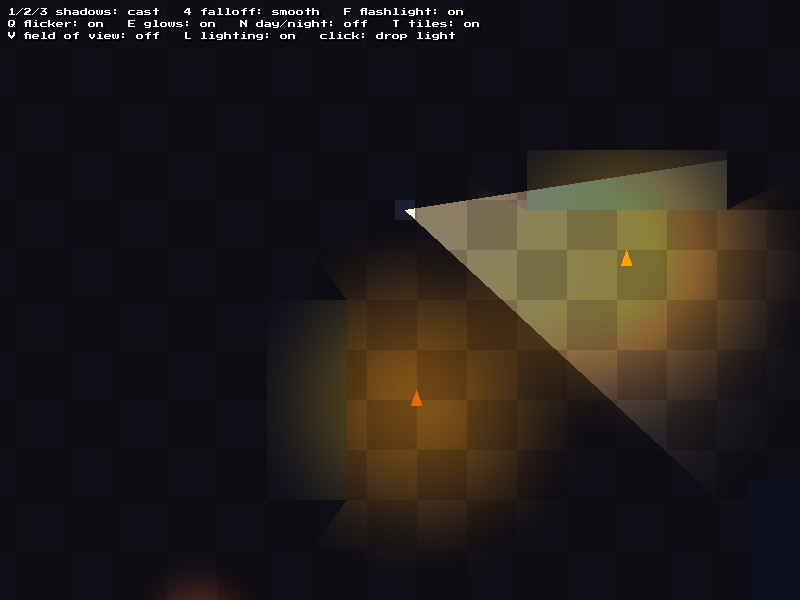
From the advanced lighting example.
LightMap
class LightMap;A screen-sized texture of light that is multiplied over the scene. Areas with no light have the ambient color.
Each frame:
- Call
clear(), then add the lights, glows and tiles for this frame. - Draw the scene.
- Call
draw()to multiply the light map over the scene.
Occluders stay until you call clear_occluders(), so add walls only one time.
Setup
| Method | Description |
|---|---|
void set_ambient(const Color& color) | Set the color of areas with no light. Black is fully dark, white is fully lit |
Color get_ambient() const | Get the ambient color |
void set_camera(const Camera* camera) | Use world positions, and convert them with the camera. The camera must stay alive while the light map uses it. Pass nullptr to use screen positions |
void set_shadow_mode(ShadowMode mode) | Set how occluders block light |
ShadowMode get_shadow_mode() const | Get the shadow mode |
void update(float dt) | Advance flicker and pulse. Call once per update |
Each frame
| Method | Description |
|---|---|
void clear() | Remove the lights, glows and tiles added this frame |
void add(const Light& light) | Add a light for this frame |
void add_glow(const Texture& texture, const Quad<float>& dest, const Color& tint = white) | Add a texture that gives off light, such as lava or a lamp sprite. Its colors are added to the light map |
void add_tiles(const TileLight& tile_light, const Vec2<float>& position = {}) | Add tile lighting with its top left at position. The TileLight must stay alive until the next draw() or render() |
void draw() | Render the light map and multiply it over the current render target |
const Texture& render() | Render the light map without drawing it, so you can draw it yourself. The render target does not change. The texture has the logical screen size |
Occluders
| Method | Description |
|---|---|
void add_occluder(const Polygonf& polygon) | Add a polygon that blocks light |
void add_occluder(const Quad<float>& rect) | Add a rectangle that blocks light |
void clear_occluders() | Remove all occluders |
const std::vector<Polygonf>& get_occluders() const | Get the occluders, e.g. for geometry::visibility() |
ShadowMode Enum
enum class ShadowMode {
  None,
  Cast,
  Visibility,
};| Value | Description |
|---|---|
None | Light goes through occluders. This is the default |
Cast | Each edge that faces away from a light casts a shadow. The side of an occluder that faces the light stays lit. One render pass for each light |
Visibility | Each light fills only the area it can see. Occluders stay dark. Faster than Cast, with hard edges |
Light
struct Light;A point light, or a spot light when cone is set. The position is in world space when the light map has a camera, and in screen space when it does not.
| Field | Type | Default | Description |
|---|---|---|---|
position | Vec2<float> | Center of the light | |
radius | float | 128 | Distance the light reaches, in pixels |
color | Color | white | Color of the light |
intensity | float | 1 | Brightness from 0 to 1. Scales the color |
falloff | Falloff | Smooth | How the light fades to its edge. See Falloff |
direction | float | 0 | Direction of a spot light, in radians. 0 points right, and angles turn clockwise on screen |
cone | float | 0 | Width of a spot light's beam, in radians. 0 lights all round |
shadows | bool | true | Whether occluders block this light |
flicker | float | 0 | Random flicker from 0 to 1. 0.2 is good for a torch |
pulse | float | 0 | Size of a steady pulse from 0 to 1 |
pulse_speed | float | 1 | Pulses per second |
seed | int | 0 | Gives each light its own flicker and pulse timing. Use a different seed for each light |
AmbientCycle
class AmbientCycle;An ambient color that changes over a cycle that repeats, such as a day.
| Method | Description |
|---|---|
explicit AmbientCycle(float length = 1.0F) | Make a cycle. length is in the same units as the time that you give to at() |
void add(float time, const Color& color) | Add a key color at a time from 0 to the length. Colors between keys are blended |
Color at(float time) const | Get the color at a time. Times after the length wrap around. Black if there are no keys |
float get_length() const | Get the length of one cycle |
TileLight
class TileLight;Light that spreads across a grid of tiles and stops at solid tiles. compute() calculates the light on the CPU and puts it in a texture with one pixel for each tile. The texture is drawn with smooth scaling, so the light blends between tiles. Add it to a light map with LightMap::add_tiles().
| Method | Description |
|---|---|
TileLight(int width, int height, float tile_size) | Make a grid, in tiles, with no solid tiles and no lights. tile_size is in pixels |
void set_solid(int x, int y, bool solid) | Set whether a tile blocks light. A solid tile is lit, but does not pass light on |
bool is_solid(int x, int y) const | Get whether a tile blocks light. Tiles outside the grid are solid |
void set_falloff(float amount) | Set how much light is lost for each tile, from 0 to 1 (default: 0.1) |
void clear_lights() | Remove all lights |
void add_light(int x, int y, const Color& color) | Add a light at a tile. The color fades as it spreads |
void compute() | Spread the lights and update the texture. Call it after lights or solid tiles change |
Color get(int x, int y) const | Get the light at a tile, after compute() |
const Texture& get_texture() const | Get the texture. Empty before compute() |
Vec2<float> get_size() const | Get the size of the grid in pixels |
Example
asw::Camera camera(asw::Vec2<float>(320.0f, 240.0f));

asw::lighting::LightMap light_map;
light_map.set_camera(&camera);
light_map.set_shadow_mode(asw::lighting::ShadowMode::Cast);
light_map.add_occluder(asw::Quad<float>(100.0f, 80.0f, 40.0f, 40.0f));

asw::lighting::AmbientCycle day(60.0f);
day.add(0.0f, asw::Color(230, 225, 210));  // Noon
day.add(30.0f, asw::Color(12, 14, 40));    // Midnight

float time = 0.0f;

asw::core::run([&]() {
  asw::core::update();
  const float dt = asw::core::get_delta_time();
  time += dt;
  light_map.update(dt);

  // Lights for this frame
  light_map.set_ambient(day.at(time));
  light_map.clear();

  asw::lighting::Light torch;
  torch.position = player_position;
  torch.radius = 96.0f;
  torch.color = asw::color::orange;
  torch.flicker = 0.2f;
  light_map.add(torch);

  // Draw the scene, then the light over it
  asw::display::clear(asw::color::black);
  draw_world(camera);
  light_map.draw();

  asw::display::present();
});